Inhaltsverzeichnis
Letzte Aktualisierung am 10.12.2025, 11:12:13 Uhr
In der Vergangenheit habe ich Artikel zu verschiedener Problemstellung bei der Nutzung von KeyHelp geschrieben. Bei KeyHelp handelt es sich um ein kostenloses Control Panel für die Verwaltung von Servern im Bereich Web- und Mail-Hosting.
Der eine oder andere wird bereits Crowdsec etwas sagen, evtl. setzen einige von euch das Tool bereits erfolgreich auf ihren Server ein. Es handelt sich um ein Open Source und partizipative Sicherheitslösung. Diese ist in der Lage Logfiles zu analysieren und entsprechend Schutz vor bösartigen IPs sicher zu stellen. Hierbei wird ein gemeinschaftlicher Ansatz verfolgt. Sprich es werden die vermeidlichen Angriffsinformationen unter allen Nutzern des Werkzeugs ausgetauscht.
Der Hersteller von Crowdsec bietet aktuell drei verschiedene Pläne für sein Produkt an. Wobei in dem meisten Fällen (wie auch bei mir) der Plan „Free“ zur Anwendung kommt.
Rahmenbedingungen
In diesem Artikel soll es dieses Mal um die Integration von Crowdsec in Verbindung mit KeyHelp gehen. In meinem Fall wird KeyHelp 23.2.1 (Build 3125) auf einem Server mit Ubuntu 22.04 LTS betrieben. Dementsprechend können die Pfade und auch Dateinamen bei Debian Servern abweichend sein.
Die Installation von Crowdsec und Firewall Bouncer ist sehr gut im Online Handbuch beschrieben. Daher gehe ich darauf nicht weiter im Detail ein.
Initiale Einrichtung
Ist die Installation erfolgreich durchgeführt können die notwendigen Collections installiert werden. Da KeyHelp Mainstream Produkte (z.B. Apache, MariaDB, ProFTPD, Postfix, etc.) vereint, gibt es dazu auch im Crowdsec Hub fertige Collections:
| Name des Dienstes | Name der Crowdsec Collections |
| Betriebssystems | crowdsecurity/linux |
| Apache2 | crowdsecurity/apache2, crowdsecurity/base-http-scenarios, crowdsecurity/http-cve |
| Postfix | crowdsecurity/postfix |
| Dovecot | crowdsecurity/dovecot |
| MariaDB | crowdsecurity/mariadb |
| ProFTPD | crowdsecurity/proftpd |
| SSH | crowdsecurity/sshd |
| crowdsecurity/whitelist-good-actors | |
| BIND9 | mstilkerich/bind9 |
Installation einer Collection muss über eine SSH Sitzung mit dem Befehl cscli erfolgen. Nachstehend ein Beispiel für die Installation von Postfix.
cscli collections install crowdsecurity/dovecot
Eine Übersicht der installierten Collections kann ebenfalls über cscli erfolgen:
cscli collections list

COLLECTIONS
──────────────────────────────────────────────────────────────────────────────────────────────────────────────────
 Name                                   Status   Version   Local Path
──────────────────────────────────────────────────────────────────────────────────────────────────────────────────
 crowdsecurity/apache2                 ✔️ enabled   0.1       /etc/crowdsec/collections/apache2.yaml
 crowdsecurity/base-http-scenarios     ✔️ enabled   0.6       /etc/crowdsec/collections/base-http-scenarios.yaml
 crowdsecurity/dovecot                 ✔️ enabled   0.1       /etc/crowdsec/collections/dovecot.yaml
 crowdsecurity/http-cve                ✔️ enabled   2.5       /etc/crowdsec/collections/http-cve.yaml
 crowdsecurity/linux                   ✔️ enabled   0.2       /etc/crowdsec/collections/linux.yaml
 crowdsecurity/mariadb                 ✔️ enabled   0.1       /etc/crowdsec/collections/mariadb.yaml
 crowdsecurity/postfix                 ✔️ enabled   0.2       /etc/crowdsec/collections/postfix.yaml
 crowdsecurity/proftpd                 ✔️ enabled   0.1       /etc/crowdsec/collections/proftpd.yaml
 crowdsecurity/sshd                    ✔️ enabled   0.2       /etc/crowdsec/collections/sshd.yaml
 crowdsecurity/whitelist-good-actors   ✔️ enabled   0.1       /etc/crowdsec/collections/whitelist-good-actors.yaml
 mstilkerich/bind9                     ✔️ enabled   0.1       /etc/crowdsec/collections/bind9.yaml
Sind alle oben aufgeführten Collections installiert, muss natürlich die Konfiguration von Crowdsec überarbeitet werden.
Zuerst eine Sicherung der Datei /etc/crowdsec/acquis.yaml anlegen.
cp /etc/crowdsec/acquis.yaml /etc/crowdsec/acquis.yaml.bak
Die Datei im Editor deiner Wahl öffnen und den Inhalt mit nachstehender Konfiguration ersetzen:
# Apache
filenames:
  - /var/log/apache2/keyhelp/access.log
  - /var/log/apache2/keyhelp/error.log
  - /var/log/apache2/keyhelp/autoconfig.access.log
  - /var/log/apache2/keyhelp/other_vhosts_access.log
  - /var/log/apache2/keyhelp/autoconfig.error.log
  - /var/log/apache2/error.log
  - /home/users/*/logs/*/access.log
  - /home/users/*/logs/*/error.log
labels:
  type: apache2
---
# SSH
journalctl_filter:
 - _SYSTEMD_UNIT=ssh.service
labels:
  type: syslog
---
# Dovecot
journalctl_filter:
 - _SYSTEMD_UNIT=dovecot.service
labels:
  type: syslog
---
# Postfix
journalctl_filter:
  - "_SYSTEMD_UNIT=postfix@-.service"
labels:
  type: syslog
---
# BIND9
journalctl_filter:
 - _SYSTEMD_UNIT=named.service
labels:
 type: syslog
---
# ProFTPD
filenames:
  - /var/log/proftpd/proftpd.log
labels:
  type: proftpd
---
# MariaDB
filenames:
  - /var/log/mysql/error.log
labels:
  type: mysql
---
Die Änderungen speichern und die Datei wieder schließen. Damit die Änderungen wirksam werden muss der Dienst noch neu gestartet werden.
sudo systemctl reload crowdsec
Danach Crowdsec auf dem Server einfach 2-3-4 Stunden laufen lassen, um Informationen aus den Journal und Logfile sammeln zu können. Hängt natürlich davon ab, wie stark der Server fragmentiert wird.
Detail können jederzeit mit dem Befehl „cscli metrics | more“ ausgegeben werden. So sieht man z.B. aus welchen Quellen Informationen erhalten worden sind.
Acquisition Metrics:
+--------------------------------------------------------------+------------+--------------+----------------+------------------------+
|                            Source                            | Lines read | Lines parsed | Lines unparsed | Lines poured to bucket |
+--------------------------------------------------------------+------------+--------------+----------------+------------------------+
| file:/home/users/ahlm/logs/mta-sts.blog.daniel.wydler.eu/ac- | 8          | 8            | -              | 10                     |
| cess.log                                                     |            |              |                |                        |
| file:/home/users/ahlm/logs/mta-sts.blog.daniel.wydler.eu/er- | 2          | 2            | -              | -                      |
| ror.log                                                      |            |              |                |                        |
| file:/home/users/ahlm/logs/mta-sts.xxxxxxx.de/access.log     | 3          | 3            | -              | 6                      |
| file:/home/users/ahlm/logs/mta-sts.xxxxxxx.de/error.log      | 1          | 1            | -              | -                      |
| file:/home/users/ahlm/logs/mta-sts.xxxxxxxx-xxxxxx.de/acces- | 14         | 14           | -              | 23                     |
| s.log                                                        |            |              |                |                        |
| file:/home/users/ahlm/logs/mta-sts.xxxxxxxx-xxxxxx.de/error- | 5          | 5            | -              | -                      |
| .log                                                         |            |              |                |                        |
| file:/home/users/ahlm/logs/mta-sts.wydler.eu/access.log      | 15         | 15           | -              | 17                     |
| file:/home/users/ahlm/logs/mta-sts.wydler.eu/error.log       | 1          | 1            | -              | -                      |
| file:/home/users/apnk/logs/www.xxxxxxx.de/access.log         | 248        | 248          | -              | 256                    |
| file:/home/users/apnk/logs/www.xxxxxxx.de/error.log          | 1          | 1            | -              | -                      |
| file:/home/users/ccvv/logs/blog.daniel.wydler.eu/access.log  | 36.54k     | 36.54k       | 2              | 5.35k                  |
| file:/home/users/ccvv/logs/blog.daniel.wydler.eu/error.log   | 1          | 1            | -              | -                      |
| file:/home/users/ccvv/logs/blog.wydler.eu/access.log         | 4.88k      | 4.88k        | -              | 2.65k                  |
| file:/home/users/ccvv/logs/blog.wydler.eu/error.log          | 1          | 1            | -              | -                      |
| file:/home/users/djth/logs/www.wydler.eu/access.log          | 409        | 409          | -              | 310                    |
| file:/home/users/djth/logs/www.wydler.eu/error.log           | 1          | 1            | -              | -                      |
| file:/home/users/epvm/logs/xxx.wydler.eu/access.log          | 316        | 316          | -              | 314                    |
| file:/home/users/idkc/logs/xxxxxxx.daniel.wydler.eu/access.- | 133        | 133          | -              | 40                     |
| log                                                          |            |              |                |                        |
| file:/home/users/kxmf/logs/xxxxxx.daniel.wydler.eu/access.l- | 767        | 767          | -              | 41                     |
| og                                                           |            |              |                |                        |
| file:/home/users/kxmf/logs/xxxxxx.xxxxxxx.de/access.log      | 15         | 15           | -              | 13                     |
| file:/home/users/vcfa/logs/ipv4.lg.daniel.wydler.eu/access.- | 3          | 3            | -              | 3                      |
| log                                                          |            |              |                |                        |
| file:/home/users/vcfa/logs/lg.daniel.wydler.eu/access.log    | 20         | 20           | -              | 13                     |
| file:/home/users/wihn/logs/yy.daniel.wydler.eu/access.log    | 64         | 64           | -              | 23                     |
| file:/home/users/xldr/logs/yyyyyyy.daniel.wydler.eu/access.- | 54         | 54           | -              | 10                     |
| log                                                          |            |              |                |                        |
| file:/home/users/zaco/logs/yyyyyyy.server03.daniel.wydler.e- | 4          | 4            | -              | 5                      |
| u/access.log                                                 |            |              |                |                        |
| file:/var/log/apache2/error.log                              | 46         | 46           | -              | -                      |
| file:/var/log/apache2/keyhelp/access.log                     | 1.08k      | 1.08k        | -              | 479                    |
| file:/var/log/apache2/keyhelp/error.log                      | 15         | 15           | -              | -                      |
| file:/var/log/apache2/keyhelp/other_vhosts_access.log        | 4.89k      | 4.89k        | -              | 3.89k                  |
| file:/var/log/proftpd/proftpd.log                            | 4          | 2            | 2              | 4                      |
| journalctl:journalctl-_SYSTEMD_UNIT=dovecot.service          | 735        | 385          | 350            | -                      |
| journalctl:journalctl-_SYSTEMD_UNIT=postfix@-.service        | 4.10k      | 576          | 3.52k          | 576                    |
| journalctl:journalctl-_SYSTEMD_UNIT=ssh.service              | 2.91k      | 1.81k        | 1.10k          | 4.73k                  |
+--------------------------------------------------------------+------------+--------------+----------------+------------------------+
In diesem Fall wird z.B. BIND9 nicht aufgelistet. Das liegt daran, dass ich den DNS Dienst von KeyHelp nicht nutze, sondern einen Externen. Da somit keine Einträge i Journal erzeugt werden, wird dieser in der Übersicht nicht aufgelistet.
Natürlich gibt es auch eine Übersicht der jeweiligen Parser und deren Statistik:
Parser Metrics:
+----------------------------------------+---------+---------+----------+
|                Parsers                 |  Hits   | Parsed  | Unparsed |
+----------------------------------------+---------+---------+----------+
| child-child-crowdsecurity/apache2-logs | 1       | 1       | -        |
| child-crowdsecurity/apache2-logs       | 49.62k  | 49.54k  | 78       |
| child-crowdsecurity/dovecot-logs       | 1.79k   | 385     | 1.40k    |
| child-crowdsecurity/http-logs          | 148.63k | 114.25k | 34.38k   |
| child-crowdsecurity/postfix-logs       | 6.08k   | 576     | 5.50k    |
| child-crowdsecurity/sshd-logs          | 23.27k  | 1.81k   | 21.45k   |
| child-crowdsecurity/syslog-logs        | 7.74k   | 7.74k   | -        |
| child-proftpd-logs                     | 10      | 2       | 8        |
| crowdsecurity/apache2-logs             | 49.55k  | 49.54k  | 2        |
| crowdsecurity/cdn-whitelist            | 95      | 95      | -        |
| crowdsecurity/dateparse-enrich         | 52.32k  | 52.32k  | -        |
| crowdsecurity/dovecot-logs             | 735     | 385     | 350      |
| crowdsecurity/geoip-enrich             | 52.27k  | 52.27k  | -        |
| crowdsecurity/http-logs                | 49.54k  | 49.37k  | 175      |
| crowdsecurity/non-syslog               | 49.55k  | 49.55k  | -        |
| crowdsecurity/postfix-logs             | 2.33k   | 576     | 1.76k    |
| crowdsecurity/rdns                     | 95      | 95      | -        |
| crowdsecurity/seo-bots-whitelist       | 95      | 95      | -        |
| crowdsecurity/sshd-logs                | 2.91k   | 1.81k   | 1.10k    |
| crowdsecurity/syslog-logs              | 7.74k   | 7.74k   | -        |
| crowdsecurity/whitelists               | 52.32k  | 52.32k  | -        |
| proftpd-logs                           | 4       | 2       | 2        |
+----------------------------------------+---------+---------+----------+
Übersicht der von Crowdsec lokale betroffener Entscheidungen:
Local API Decisions:
+--------------------------------------------+----------+--------+-------+
|                   Reason                   |  Origin  | Action | Count |
+--------------------------------------------+----------+--------+-------+
| crowdsecurity/http-path-traversal-probing  | CAPI     | ban    | 85    |
| crowdsecurity/CVE-2022-35914               | CAPI     | ban    | 57    |
| crowdsecurity/http-bf-wordpress_bf         | CAPI     | ban    | 962   |
| crowdsecurity/http-open-proxy              | CAPI     | ban    | 555   |
| crowdsecurity/CVE-2022-26134               | CAPI     | ban    | 180   |
| crowdsecurity/CVE-2022-37042               | CAPI     | ban    | 22    |
| crowdsecurity/http-crawl-non_statics       | CAPI     | ban    | 552   |
| crowdsecurity/http-bad-user-agent          | CAPI     | ban    | 7402  |
| crowdsecurity/http-bad-user-agent          | crowdsec | ban    | 14    |
| crowdsecurity/jira_cve-2021-26086          | CAPI     | ban    | 24    |
| crowdsecurity/thinkphp-cve-2018-20062      | CAPI     | ban    | 79    |
| crowdsecurity/dovecot-spam                 | CAPI     | ban    | 4162  |
| crowdsecurity/http-backdoors-attempts      | CAPI     | ban    | 982   |
| crowdsecurity/ssh-bf                       | CAPI     | ban    | 13852 |
| ltsich/http-w00tw00t                       | CAPI     | ban    | 3     |
| crowdsecurity/CVE-2022-41082               | CAPI     | ban    | 997   |
| crowdsecurity/http-cve-2021-41773          | CAPI     | ban    | 29    |
| crowdsecurity/http-probing                 | CAPI     | ban    | 2444  |
| crowdsecurity/http-wordpress_user-enum     | CAPI     | ban    | 653   |
| firehol_botscout_7d                        | lists    | ban    | 3808  |
| firehol_cybercrime                         | lists    | ban    | 469   |
| crowdsecurity/CVE-2022-42889               | CAPI     | ban    | 14    |
| crowdsecurity/http-generic-bf              | CAPI     | ban    | 19    |
| crowdsecurity/f5-big-ip-cve-2020-5902      | CAPI     | ban    | 25    |
| crowdsecurity/fortinet-cve-2018-13379      | CAPI     | ban    | 84    |
| crowdsecurity/http-sensitive-files         | CAPI     | ban    | 11    |
| crowdsecurity/postfix-spam                 | crowdsec | ban    | 1     |
| crowdsecurity/postfix-spam                 | CAPI     | ban    | 4407  |
| crowdsecurity/ssh-slow-bf                  | CAPI     | ban    | 25    |
| crowdsecurity/ssh-slow-bf                  | crowdsec | ban    | 6     |
| firehol_cruzit_web_attacks                 | lists    | ban    | 13252 |
| crowdsecurity/CVE-2019-18935               | CAPI     | ban    | 55    |
| crowdsecurity/apache_log4j2_cve-2021-44228 | CAPI     | ban    | 424   |
| crowdsecurity/netgear_rce                  | CAPI     | ban    | 41    |
| crowdsecurity/proftpd-bf                   | CAPI     | ban    | 50    |
| crowdsecurity/grafana-cve-2021-43798       | CAPI     | ban    | 65    |
| crowdsecurity/mariadb-bf                   | CAPI     | ban    | 17    |
+--------------------------------------------+----------+--------+-------+
Natürlich darf die Übersicht der aktiven Bans nicht fehlen:
 cscli decisions list
╭─────────┬──────────┬───────────────────────────────┬───────────────────────────────────┬────────┬─────────┬─────────────────────────────────────────────────────────┬────────┬─────────────────────┬──────────╮
│   ID    │  Source  │          Scope:Value          │              Reason               │ Action │ Country │                           AS                            │ Events │     expiration      │ Alert ID │
├─────────┼──────────┼───────────────────────────────┼───────────────────────────────────┼────────┼─────────┼─────────────────────────────────────────────────────────┼────────┼─────────────────────┼──────────┤
│ 5027445 │ crowdsec │ Ip:157.230.36.150             │ crowdsecurity/ssh-slow-bf         │ ban    │ SG      │ 14061 DIGITALOCEAN-ASN                                  │ 20     │ 20h11m47.844177743s │ 9556     │
│ 4995208 │ crowdsec │ Ip:45.84.138.184              │ crowdsecurity/ssh-slow-bf         │ ban    │ DE      │ 51167 Contabo GmbH                                      │ 20     │ 17h37m42.721598678s │ 9551     │
│ 4980207 │ crowdsec │ Ip:124.223.39.239             │ crowdsecurity/ssh-slow-bf         │ ban    │ CN      │ 45090 Shenzhen Tencent Computer Systems Company Limited │ 28     │ 16h56m24.471143094s │ 9549     │
│ 4980206 │ crowdsec │ Ip:178.34.151.144             │ crowdsecurity/ssh-slow-bf         │ ban    │ RU      │ 12389 Rostelecom                                        │ 27     │ 16h52m9.751517031s  │ 9548     │
│ 4980205 │ crowdsec │ Ip:43.155.129.185             │ crowdsecurity/ssh-slow-bf         │ ban    │ KR      │ 132203 Tencent Building, Kejizhongyi Avenue             │ 22     │ 16h48m55.219474518s │ 9547     │
│ 4980204 │ crowdsec │ Ip:169.47.92.197              │ crowdsecurity/ssh-slow-bf         │ ban    │ US      │ 36351 SOFTLAYER                                         │ 20     │ 16h41m37.969035856s │ 9546     │
│ 4980203 │ crowdsec │ Ip:167.94.145.57              │ crowdsecurity/http-bad-user-agent │ ban    │ US      │ 398705 CENSYS-ARIN-02                                   │ 2      │ 16h11m53.470598884s │ 9545     │
│ 4980202 │ crowdsec │ Ip:167.94.146.57              │ crowdsecurity/http-bad-user-agent │ ban    │ US      │ 398705 CENSYS-ARIN-02                                   │ 2      │ 15h49m14.543231614s │ 9544     │
│ 4980201 │ crowdsec │ Ip:64.227.146.163             │ crowdsecurity/http-bad-user-agent │ ban    │ IN      │ 14061 DIGITALOCEAN-ASN                                  │ 2      │ 15h38m20.551143417s │ 9543     │
│ 4965200 │ crowdsec │ Ip:195.191.219.132            │ crowdsecurity/http-bad-user-agent │ ban    │ GB      │ 3170 VeloxServ Communications Ltd                       │ 2      │ 14h4m1.41547488s    │ 9541     │
│ 4965199 │ crowdsec │ Ip:195.191.219.133            │ crowdsecurity/http-bad-user-agent │ ban    │ GB      │ 3170 VeloxServ Communications Ltd                       │ 2      │ 13h28m57.177967926s │ 9540     │
│ 4965198 │ crowdsec │ Ip:95.91.109.50               │ crowdsecurity/http-bad-user-agent │ ban    │ DE      │ 3209 Vodafone GmbH                                      │ 2      │ 13h16m16.672252187s │ 9539     │
│ 4902961 │ crowdsec │ Ip:157.90.209.81              │ crowdsecurity/http-bad-user-agent │ ban    │ DE      │ 24940 Hetzner Online GmbH                               │ 2      │ 8h40m25.911768882s  │ 9532     │
│ 4902960 │ crowdsec │ Ip:71.6.167.142               │ crowdsecurity/postfix-spam        │ ban    │ US      │ 10439 CARINET                                           │ 6      │ 8h1m47.678250094s   │ 9531     │
│ 4870842 │ crowdsec │ Ip:42.236.17.245              │ crowdsecurity/http-bad-user-agent │ ban    │ CN      │ 4837 CHINA UNICOM China169 Backbone                     │ 2      │ 5h36m22.112898982s  │ 9526     │
│ 4855841 │ crowdsec │ Ip:167.248.133.34             │ crowdsecurity/http-bad-user-agent │ ban    │ US      │ 398722 CENSYS-ARIN-03                                   │ 2      │ 3h48m7.771592182s   │ 9524     │
│ 4855840 │ crowdsec │ Ip:2602:80d:1000:b0cc:e:2:5:3 │ crowdsecurity/http-bad-user-agent │ ban    │ US      │ 398722 CENSYS-ARIN-03                                   │ 2      │ 3h48m1.397738097s   │ 9523     │
│ 4840839 │ crowdsec │ Ip:2620:96:e000:b0cc:e:2:1:7  │ crowdsecurity/http-bad-user-agent │ ban    │ US      │ 398324 CENSYS-ARIN-01                                   │ 2      │ 2h16m55.860071985s  │ 9521     │
│ 4808721 │ crowdsec │ Ip:167.114.159.183            │ crowdsecurity/http-bad-user-agent │ ban    │ CA      │ 16276 OVH SAS                                           │ 2      │ 45m3.605748551s     │ 9516     │
│ 4808720 │ crowdsec │ Ip:167.248.133.36             │ crowdsecurity/http-bad-user-agent │ ban    │ US      │ 398722 CENSYS-ARIN-03                                   │ 2      │ 30m9.525910948s     │ 9515     │
│ 4808719 │ crowdsec │ Ip:157.90.91.229              │ crowdsecurity/http-bad-user-agent │ ban    │ DE      │ 24940 Hetzner Online GmbH                               │ 2      │ 23m36.841475868s    │ 9514     │
╰─────────┴──────────┴───────────────────────────────┴───────────────────────────────────┴────────┴─────────┴─────────────────────────────────────────────────────────┴────────┴─────────────────────┴──────────╯
Um die vollständige Tabelle zu sehen, bitte rechts oben „Open Code in a new windows“ anklicken.
Einen Ban löschen
Natürlich kann auch ein vermeidlicher falscher Ban manuell jederzeit entfernt werden. Gerade wenn man neue Collections testet kanns es durch aus passieren, dass die eigene IP-Adresse eintragen wird.
Der Befehl für das Löschen eines Eintrags lautet cscli decisions delete.
Usage:

  cscli decisions delete [options] [flags]


Aliases:

  delete, remove


Examples:

cscli decisions delete -r 1.2.3.0/24
cscli decisions delete -i 1.2.3.4
cscli decisions delete --id 42
cscli decisions delete --type captcha


Flags:

  -i, --ip string         Source ip (shorthand for --scope ip --value <IP>)
  -r, --range string      Range source ip (shorthand for --scope range --value <RANGE>)
  -t, --type string       the decision type (ie. ban,captcha)
  -v, --value string      the value to match for in the specified scope
  -s, --scenario string   the scenario name (ie. crowdsecurity/ssh-bf)
      --origin string     the value to match for the specified origin (cscli,crowdsec,console,cscli-import,lists,CAPI ...)
      --id string         decision id
      --all               delete all decisions
      --contained         query decisions contained by range
  -h, --help              help for delete
Es gibt natürlich mehrere Möglichkeiten um einen Bann zu entfernen. Bitte den Abschnitt „Beispiele“ beachten. Die Änderung wird sofort wirksam.
Benutzerdefinierte Whitelist erstellen
Eine Whitelist nutze ich gerne für meine Monitoring Systeme. Weil diese oftmals früher oder später als vermeidlichen Angreifer erkannt werden, gebannt und damit einen Alarm auslösen.
Neue YAML Datei anlegen und die IPv4 und IPv6 Adressen/Subnetzen hinzufügen.
cat << EOF > /etc/crowdsec/parsers/s02-enrich/wydler.eu-whitelist.yaml
name: crowdsecurity/whitelists
description: "Whitelist events from ipv4 addresses"
whitelist:
  reason: "ipv4/ipv6 ip/ranges"
  ip:
    - "46.223.45.56"
  cidr:
    - "46.223.0.0/17"
    - "2a02:8070::/31"
  expression:
    - evt.Overflow.Alert.Source.IP in LookupHost("wydler.eu")

EOF
Damit die neue Konfigurationsdatei eingelesen wird, muss der Dienst neu geladen werden.
systemctl reload crowdsec
Prüfung, ob die neue Konfiguration angewendet.
cscli parsers list

PARSERS
─────────────────────────────────────────────────────────────────────────────────────────────────────────────────────────
Name  Status Version Local Path
─────────────────────────────────────────────────────────────────────────────────────────────────────────────────────────
crowdsecurity/apache2-logs ✔️ enabled 1.4 /etc/crowdsec/parsers/s01-parse/apache2-logs.yaml
...
wydler.eu-whitelist.yaml  enabled,local /etc/crowdsec/parsers/s02-enrich/wydler.eu-whitelist.yaml
─────────────────────────────────────────────────────────────────────────────────────────────────────────────────────────
WordPress schützen
Eines der beliebtesten Content Management Systeme (CMS) dürfte WordPress sein. Daher beschreibe ich an dieser Stelle die Nutzung von CrowdSec in Verbindung mit WordPress. Im Grund besteht die Einrichtung und Konfiguration aus einem Zweiteiler.
Installation der Collection für CrowdSec:
cscli collections install crowdsecurity/wordpress
Installation des Bouncers für WordPress:
cscli bouncers add cs-wordpress-bouncer
Mit der Installation wird auch ein API Key erzeugt uns ausgegeben. Diesen Key gut aufbewahren, da dieser später für das WordPress Plugin notwendig ist.
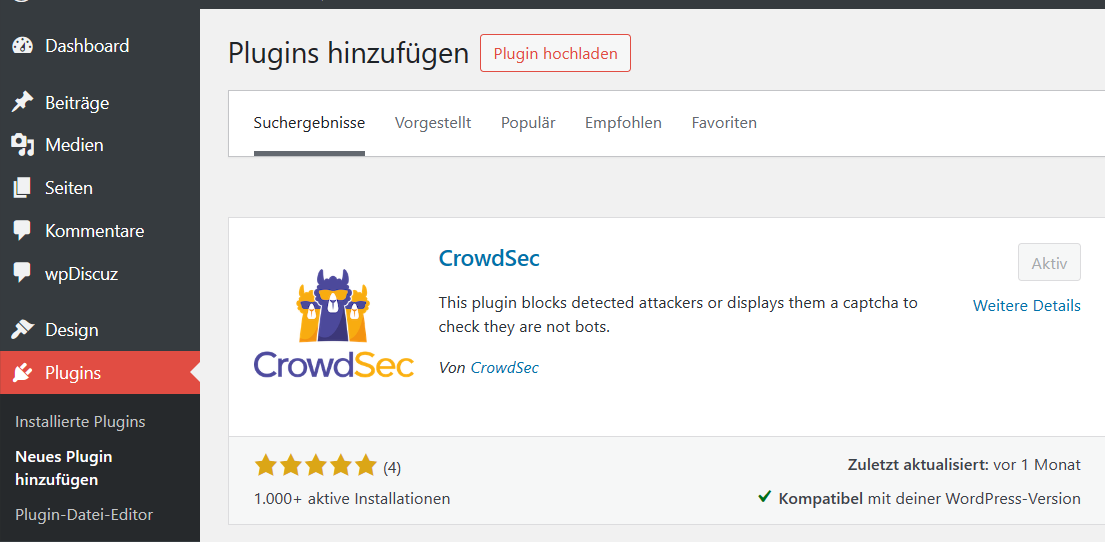
Installation des Plugins für WordPress.
 |
 |
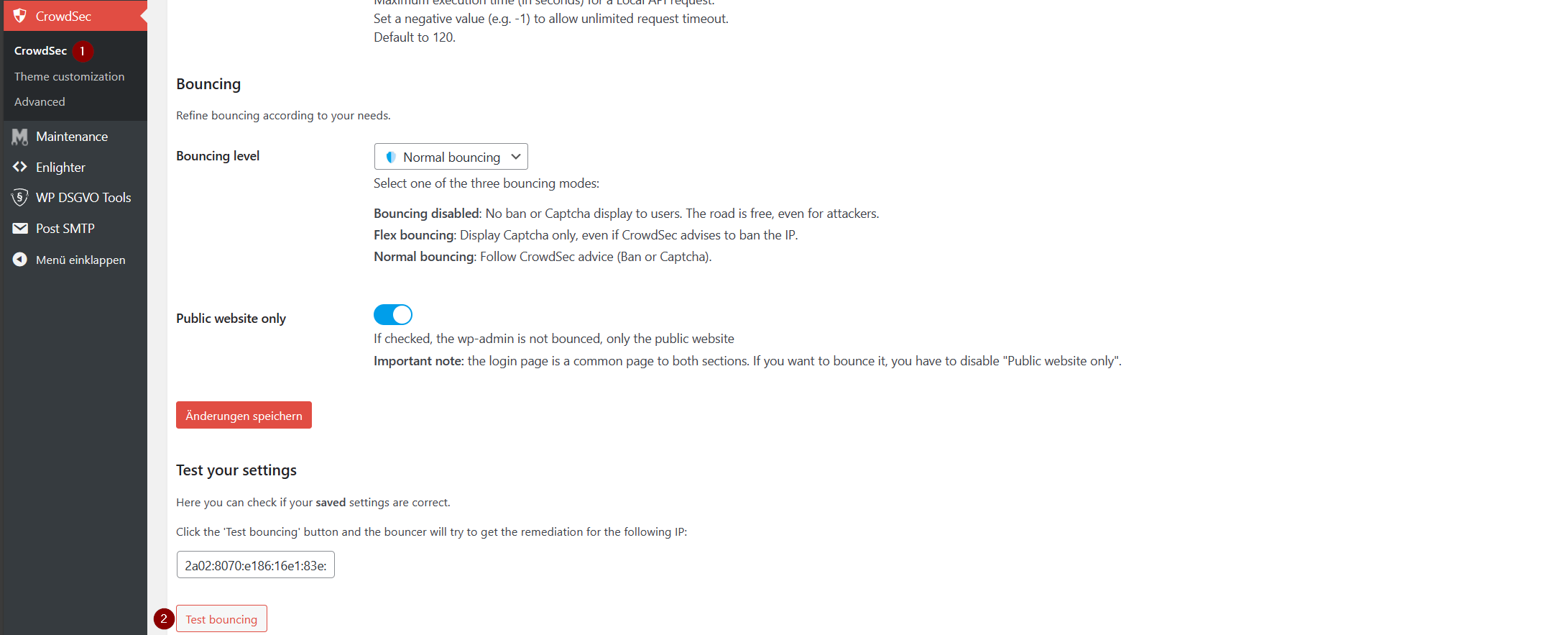
Abschließender Funktionstest des Bouncers.
 |
 |
Geolocation einrichten
ieses Modul basiert auf MaxMind GeoIP-Datenbank. Der eine oder andere kennt evtl. die freie Version der GeoIP Datenbank. Diese gibt es nach wie vor. Um diese nutzen zu können, muss auf der Internetseite ein kostenloses Benutzerkonto angelegt werden.
Wenn das Benutzer angelegt und aktiviert ist, kann License Key erzeugt werden. Nach der Anmeldung gibt es auf der linken Seite das Navigationsmenü. Im Bereich Account gibts einen Eintrag „Manage License Keys“. Anschließend auf die Schaltfläche „generate new license key“ klicken und den Anweisungen folgen.
Installation von GeoIP auf dem Server.
apt install -y geoipupdate
geoipupdate -V
Nach der Installation muss der vorher erzeugte Lizenz Schlüssel und dazugehörige Account ID in die Konfiguration eingetragen werden. Jedoch wird zu vor eine Kopie der originalen Konfiguration erstellt. Nicht vergessen, in den Zeilen 2 & 3 eure Daten zu hinterlegen!
cp /etc/GeoIP.conf /etc/GeoIP.conf.bak
sed -i 's/# AccountID YOUR_ACCOUNT_ID_HERE/AccountID 123456/g' /etc/GeoIP.conf
sed -i 's/# LicenseKey YOUR_LICENSE_KEY_HERE/LicenseKey abcdef_ghijklmnopqrstuvwxzabcdefgehi_jkl/g' /etc/GeoIP.conf
Manuelle Aktualisierung der Datenbank.
geoipupdate -v

geoipupdate version 4.6.0
Using config file /etc/GeoIP.conf
Using database directory /var/lib/GeoIP
Performing get filename request to https://updates.maxmind.com/app/update_getfilename?product_id=GeoLite2-Country
Acquired lock file lock (/var/lib/GeoIP/.geoipupdate.lock)
Calculated MD5 sum for /var/lib/GeoIP/GeoLite2-Country.mmdb: 32c6d31d54e21cb098c98e92872356f1
Performing update request to https://updates.maxmind.com/geoip/databases/GeoLite2-Country/update?db_md5=32c6d31d54e21cb098c98e92872356f1
No new updates available for GeoLite2-Country
Performing get filename request to https://updates.maxmind.com/app/update_getfilename?product_id=GeoLite2-City
Acquired lock file lock (/var/lib/GeoIP/.geoipupdate.lock)
Calculated MD5 sum for /var/lib/GeoIP/GeoLite2-City.mmdb: 4ab99947c489155020040aaf82fe1038
Performing update request to https://updates.maxmind.com/geoip/databases/GeoLite2-City/update?db_md5=4ab99947c489155020040aaf82fe1038
No new updates available for GeoLite2-City
Die aktuellen Daten bzw. die beiden Dateien werden standardmäßig unter „/var/lib/GeoIP“ abgelegt.
ls -lisa /var/lib/GeoIP
total 74320
257122     4 drwxr-xr-x  2 root root     4096 Dec 25 12:14 ./
129257     4 drwxr-xr-x 38 root root     4096 Dec 25 12:20 ../
257109     0 -rw-------  1 root root        0 Dec 25 12:14 .geoipupdate.lock
257123 68140 -rw-r--r--  1 root root 69773675 Dec 25 12:14 GeoLite2-City.mmdb
257111  6172 -rw-r--r--  1 root root  6320117 Dec 25 12:14 GeoLite2-Country.mmdb
Automatische Aktualisierung mit Hilfe von Cron.
cat << EOF >> /etc/cron.daily/geoip-update-db
#!/bin/sh

/usr/bin/geoipupdate -v
EOF

chmod 755 /etc/cron.daily/geoip-update-db
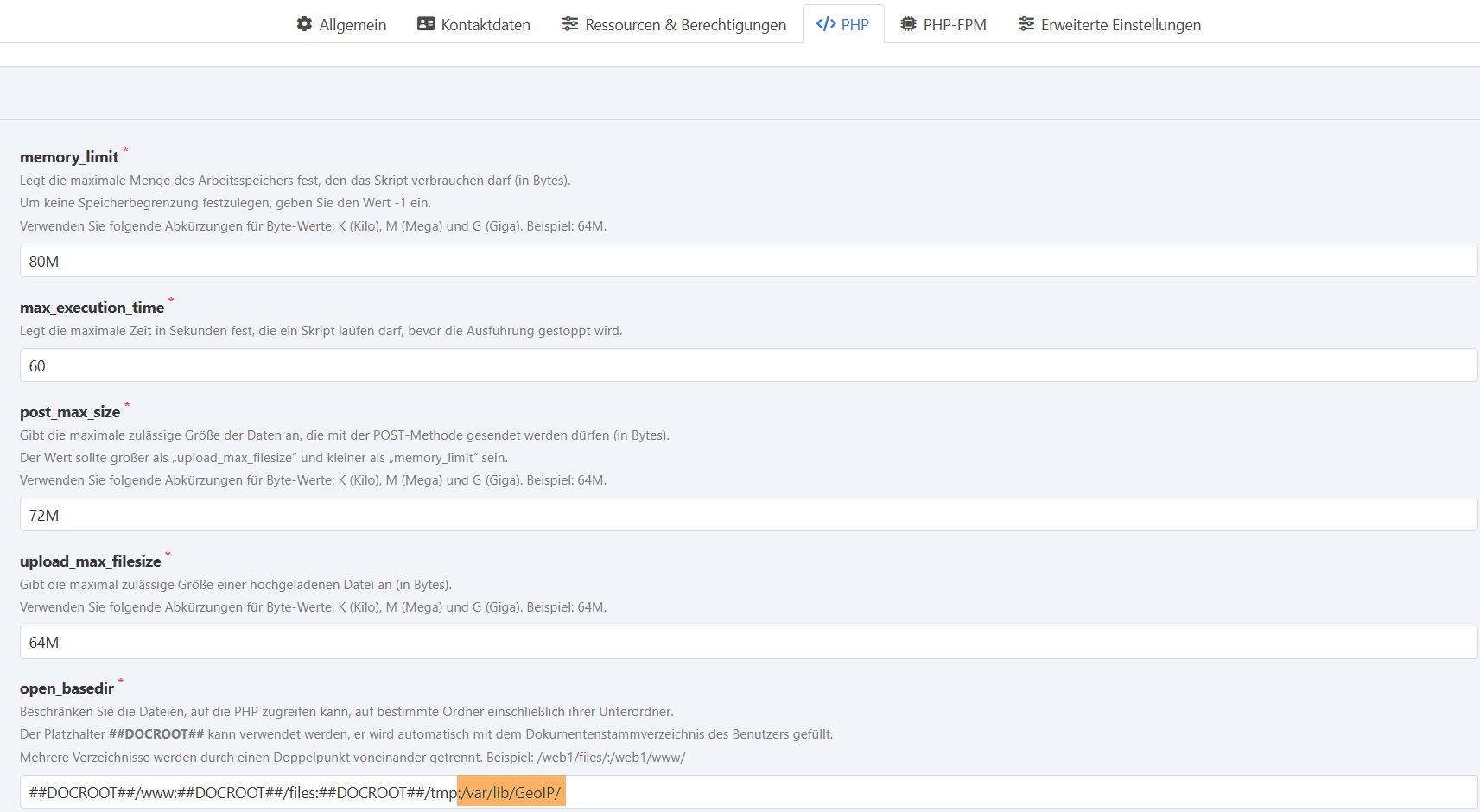
Durch den Einsatz von KeyHelp wird für jeden Benutzerkonto automatisch auch die Funktion „openbase.dir“ aktiviert und konfiguriert. Daher muss in dem betroffenen Benutzer dem Parameter noch den Pfad „/var/lib/GeoIP“ hinzugefügt werden.
 |
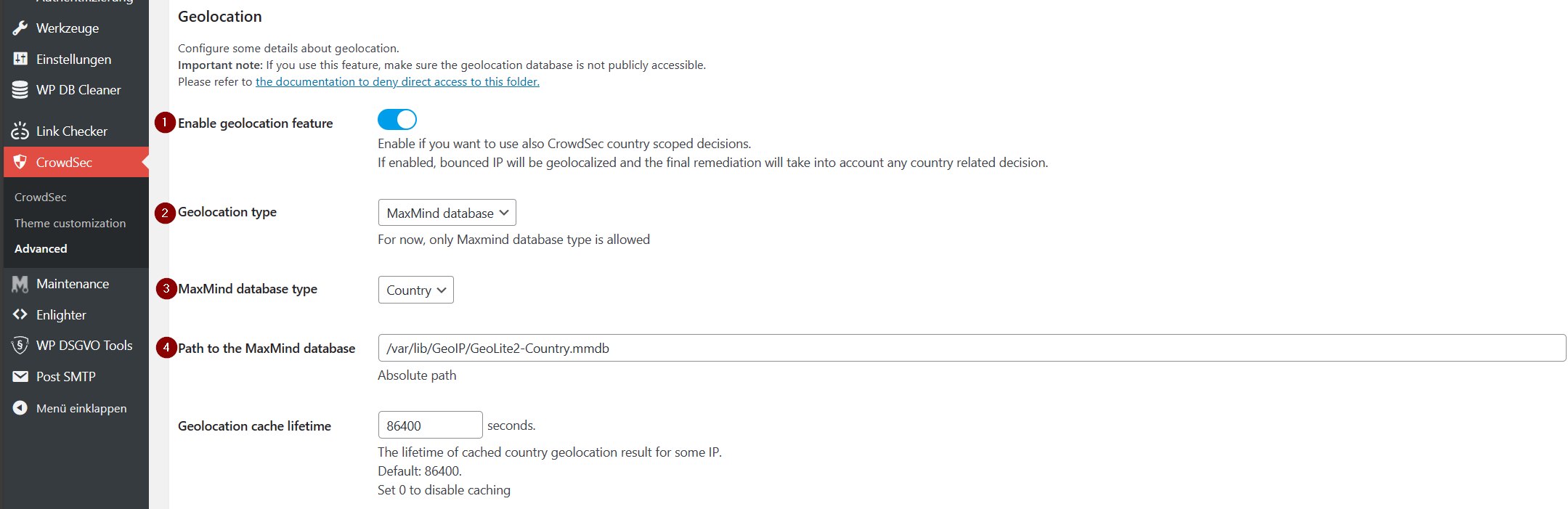
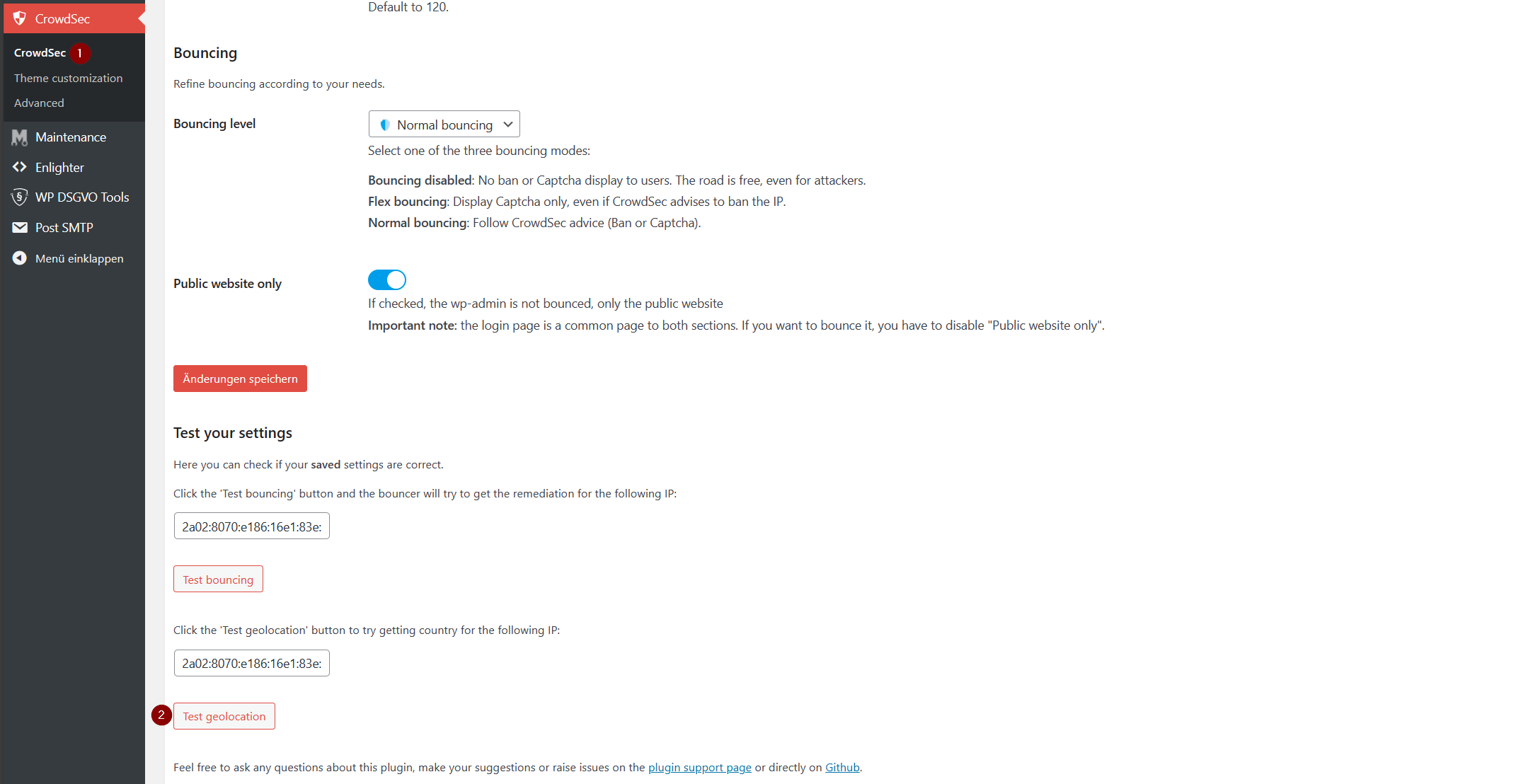
Anschließend kann die GeoIP Funktion in WordPress Plugin CrowdSec konfiguriert werden.
 |
Abschließend darf natürlich der Funktionstest nicht fehlen.
 |
 |
Fazit
Auf meinen KeyHelp Servern nutze ich Crowdsec nun bereits über 3 Monaten. Ich muss sagen, bis dato keinen einzigen False Positive Alarm. Gerade bei Postfix hatte ich die Befürchtung, dass der eine oder andere reguläre E-Mail-Server geblockt wird. Dem war bis dato Gott sei Dank nicht so. Ganz im Gegenteil es ist erstaunlich welches Grundrauschen von Crowdsec permanent unterbunden wird.
Viel Spaß beim Ausprobieren. 🙂